Tutorial · Calendar
Calendar: work on a timeline
The calendar places tasks, scheduled runs, and executions on a day, week, or agenda view, so deadlines and workload are visible in time, not just in a list.
4 min read · Everyone
Tutorial · Calendar
The calendar places tasks, scheduled runs, and executions on a day, week, or agenda view, so deadlines and workload are visible in time, not just in a list.
4 min read · Everyone
The calendar
Switch between Month, Week, and Agenda, and toggle the Tasks, Schedules, and Executions layers on or off. Events are color-coded by type; click a day to open a detail panel listing everything happening that day, with its run and status.
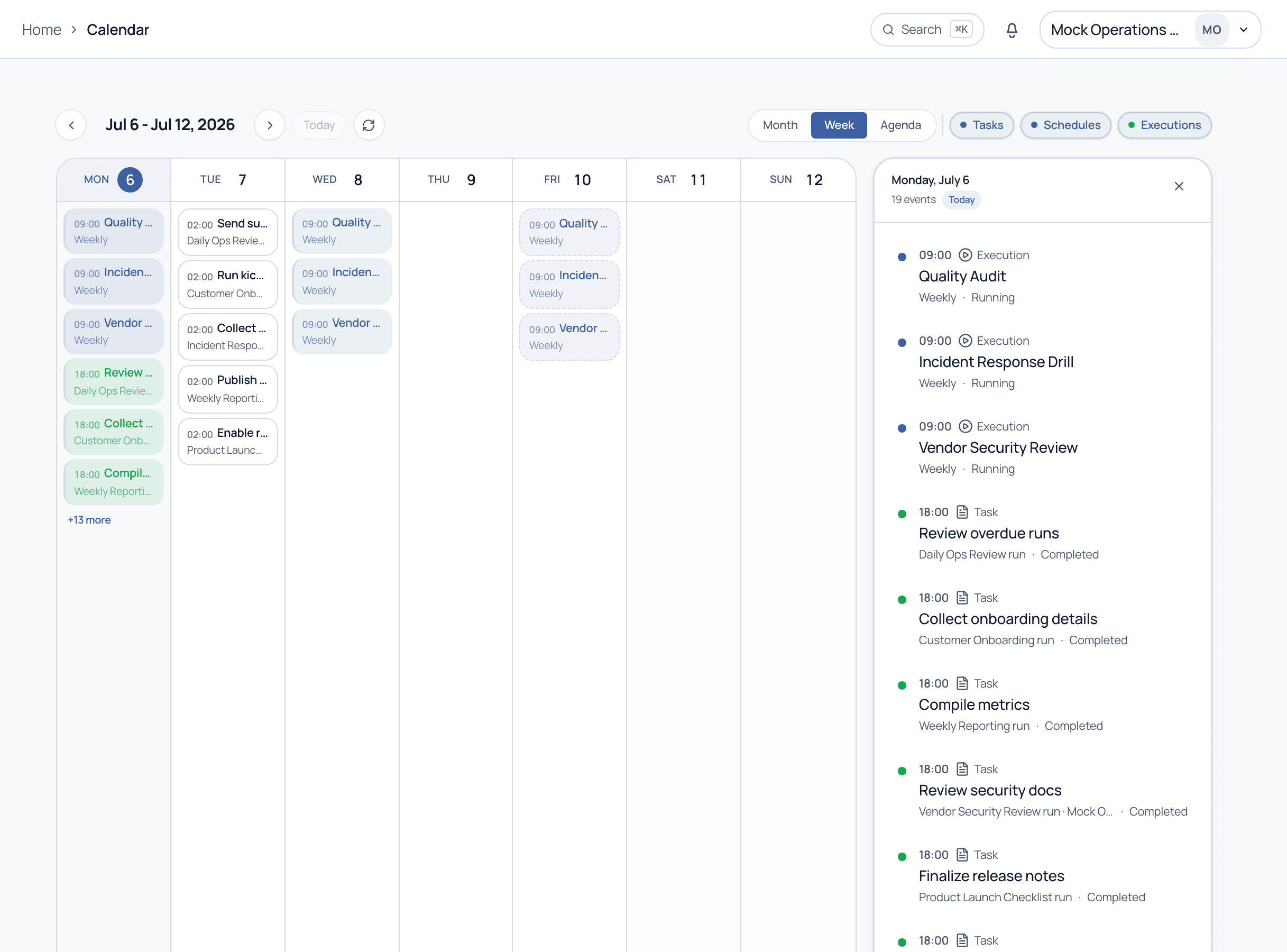
Use the Agenda view for a clean, list-style read of a single day when the grid gets busy. The day panel on the right always shows the full, ordered list of what is happening.
A schedule starts a run automatically on a recurring or future date, for example a Weekly Reporting run every Friday. Scheduled runs appear on the calendar before they launch.
Yes. Toggle off the Executions and Schedules layers to focus the calendar purely on task deadlines.
See the calendar, schedules, and workload planning on a guided demo.