Tutorial · Inbox
Inbox: your personal to-do across every flow
The Inbox pulls the tasks, approvals, notifications, and mentions assigned to you out of every run and into one prioritized list, grouped by urgency.
5 min read · Everyone
Tutorial · Inbox
The Inbox pulls the tasks, approvals, notifications, and mentions assigned to you out of every run and into one prioritized list, grouped by urgency.
5 min read · Everyone
The Inbox
Open Inbox from the top of the sidebar. Tasks are grouped by urgency, Overdue first, then Today, so the most pressing work is always on top. Each card shows the task name, its due state, which Flow it belongs to, and the run it lives in. The four tabs switch between Tasks, Approvals, Notifications, and Mentions.
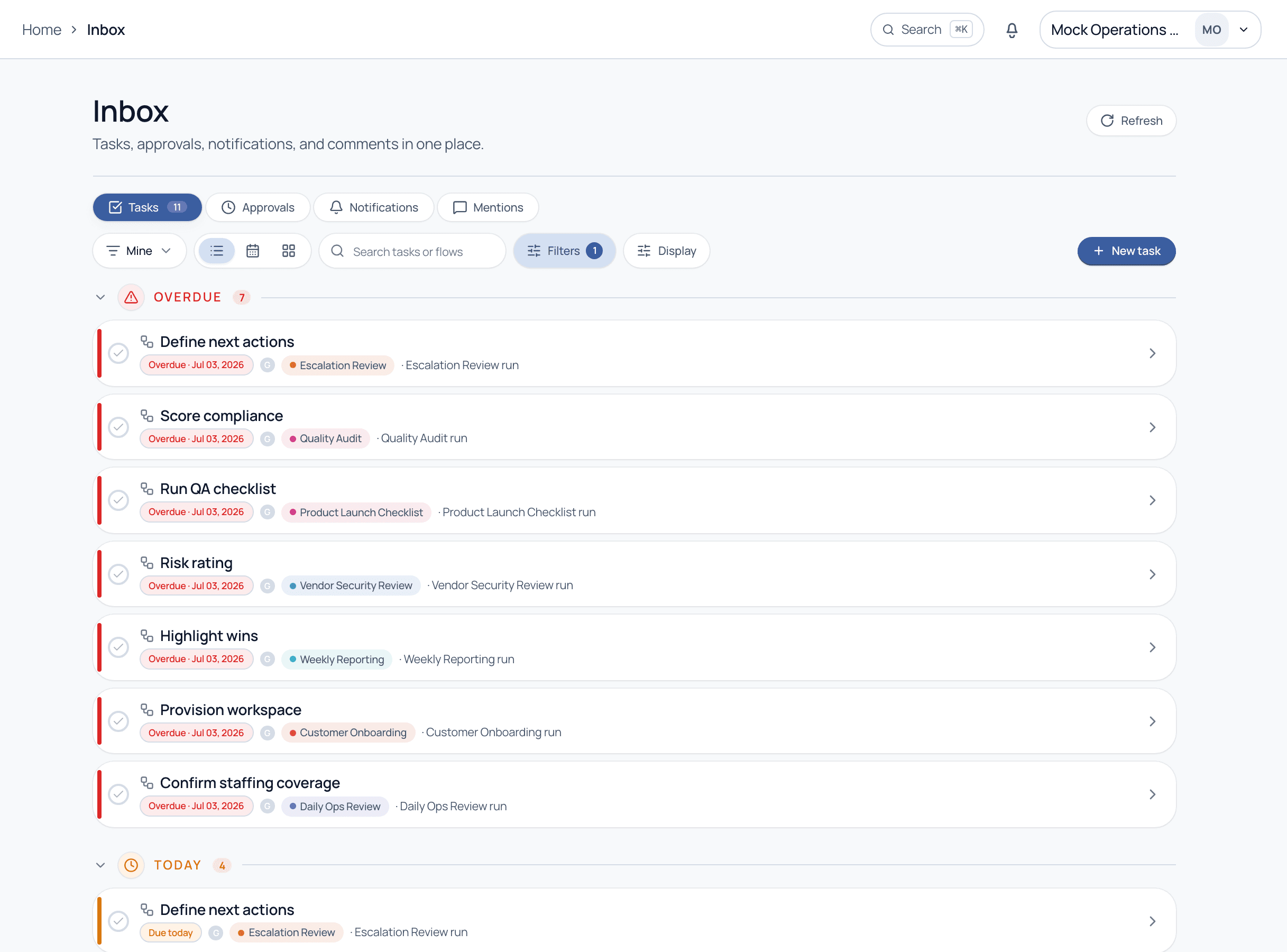
One surface, four kinds of things that need your attention.
Walkthrough
The Overdue group is always first, then Today. Working top-down means you always hit the most time-critical work before anything else.
The Mine dropdown controls whose work you see. Managers can widen it to a team view; individual contributors keep it on their own tasks.
Use Filters and the search box to narrow to a specific flow or keyword when your inbox is busy. The count on the Tasks tab tells you how much is queued.
Toggle between list, calendar, and board views. The board groups tasks into columns, calendar places them on due dates, list is the fast default.
Check off a task to complete it, click a card to open its run for full context, or use New task to add an ad-hoc to-do that is not part of a flow.
You do not need to know which flow a task belongs to. The Inbox is designed so people can just work their queue top to bottom; the governance and routing happen behind the scenes.
The Inbox only surfaces tasks that are actually available to you. A step still blocked by an earlier task or a logic rule waits off-list until its conditions are met, so you are never shown work you cannot do yet.
A one-off to-do you create with New task that is not part of any flow. It is useful for capturing follow-ups, and Cadenio can even suggest turning a repeated ad-hoc task into a reusable flow.
Yes, on the Approvals tab. Approvals are a distinct kind of work with their own policy (ANY / ALL approvers, required comments, or signatures), so they get their own tab rather than mixing into Tasks.
See how the Inbox keeps a whole team aligned without status-chasing, on a guided demo.