Not everything is a repeatable process. A standalone task is a one-off to-do you create in seconds, assign to a person (or keep for yourself), give a due date and priority, and track in My Work, without building a whole flow.
3 min read · Everyone
New task
Capture a to-do in seconds
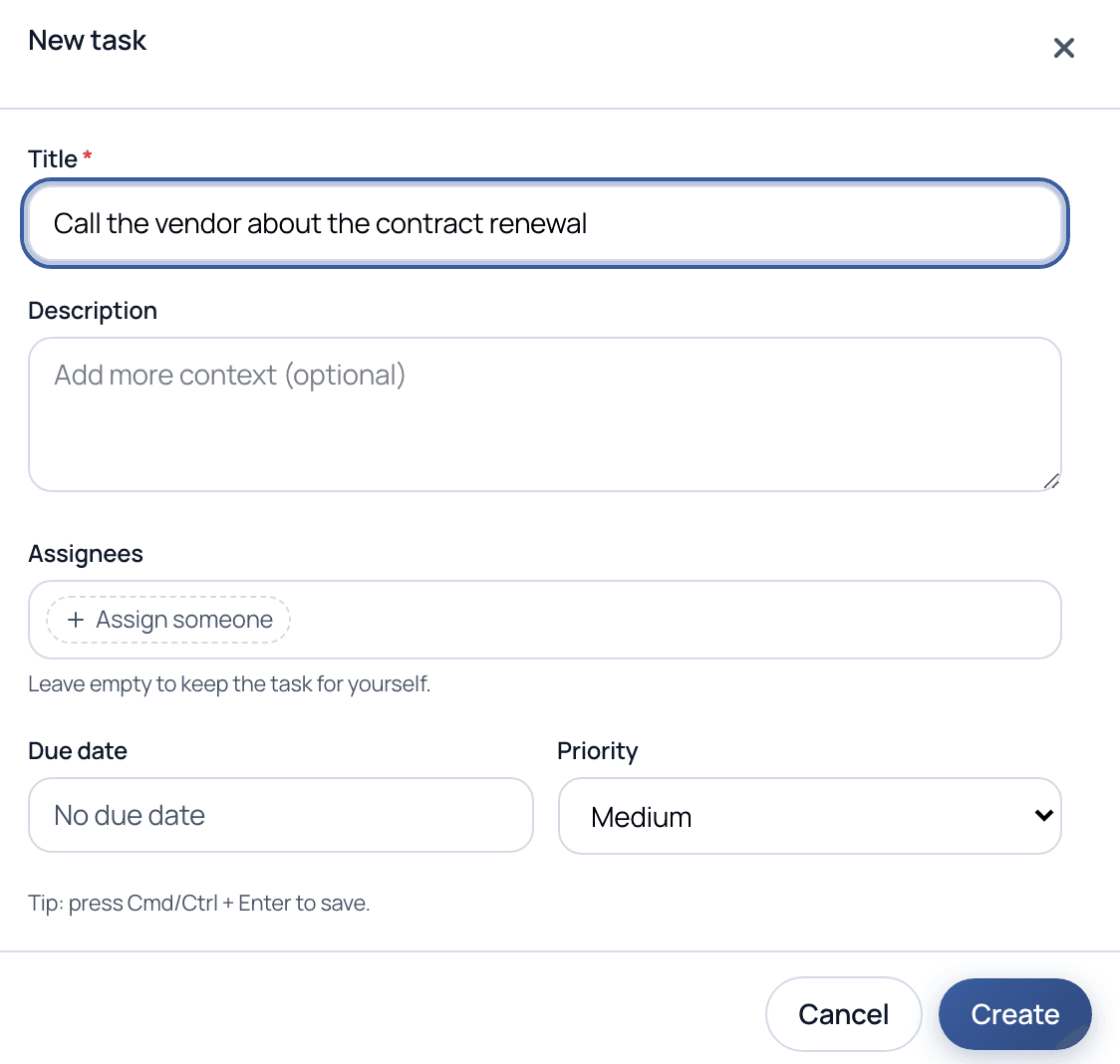
Click New task anywhere in My Work. Give it a title, optionally add context, assign it to someone (or leave it empty to keep it for yourself), and set a due date and priority. That's it, no template, no flow, no setup.
The New task dialog. A standalone task needs only a title; everything else is optional.
What goes on a task
Only the title is required. Add the rest when it helps.
Title: A short, clear statement of what needs to happen.
Description: Optional context, links, or notes for whoever picks it up.
Assignees: One or more people or groups. Leave it empty to keep the task for yourself.
Due date: An optional deadline, with or without a specific time, so it lands in the right urgency group.
Priority: Low, Medium, High, or Urgent, to help everyone triage.
Walkthrough
Add and track a standalone task
1
Open New task
From My Work, click New task. The dialog opens with the cursor in the title field.
2
Assign it, or keep it
Add an assignee to hand it off, or leave it empty and it stays on your own list.
3
Set due date and priority
Give it a deadline and a priority so it sorts into the right urgency group in everyone's queue.
4
Track it in My Work
The task appears in the assignee's My Work alongside their flow tasks, grouped by urgency (Overdue, This week).
5
Complete it, or promote it
Check it off when done. If you find yourself creating the same task over and over, Cadenio can suggest turning it into a reusable flow.
Reach for a standalone task when the work is genuinely one-off, a follow-up call, a quick review, a reminder. When the same task keeps coming back with the same steps, that's the signal to make it a flow so nothing gets forgotten.
Common questions
How is a standalone task different from a flow?
A flow is a reusable process with defined steps, logic, and approvals. A standalone task is a single to-do with no steps or template, created on the spot. Both show up in My Work; the task just skips all the structure.
Can I assign a task to someone else?
Yes. Add one or more assignees and it lands in their My Work. Leave assignees empty and the task stays on your own list.
Where do standalone tasks show up?
In My Work, on the Tasks tab, alongside tasks from flows, grouped by urgency. A standalone task has no flow tag, so it is easy to spot.
Can a repeated task become a flow?
Yes. When Cadenio notices you keep creating the same ad-hoc task, it can suggest promoting it into a reusable flow, so recurring work gets real structure and an audit trail.
Give every quick to-do a home
See how standalone tasks and flows live side by side in one queue, on a guided demo.