Projects: run initiatives on visual boards, with governance
Projects give you Kanban boards for work that has a beginning and an end. Cards carry owners, deadlines, checklists, and an audit trail, approval columns gate what moves, and you can attach an entire recurring Flow as a card.
5 min read · Managers and teams
The project board
A visual board for every initiative
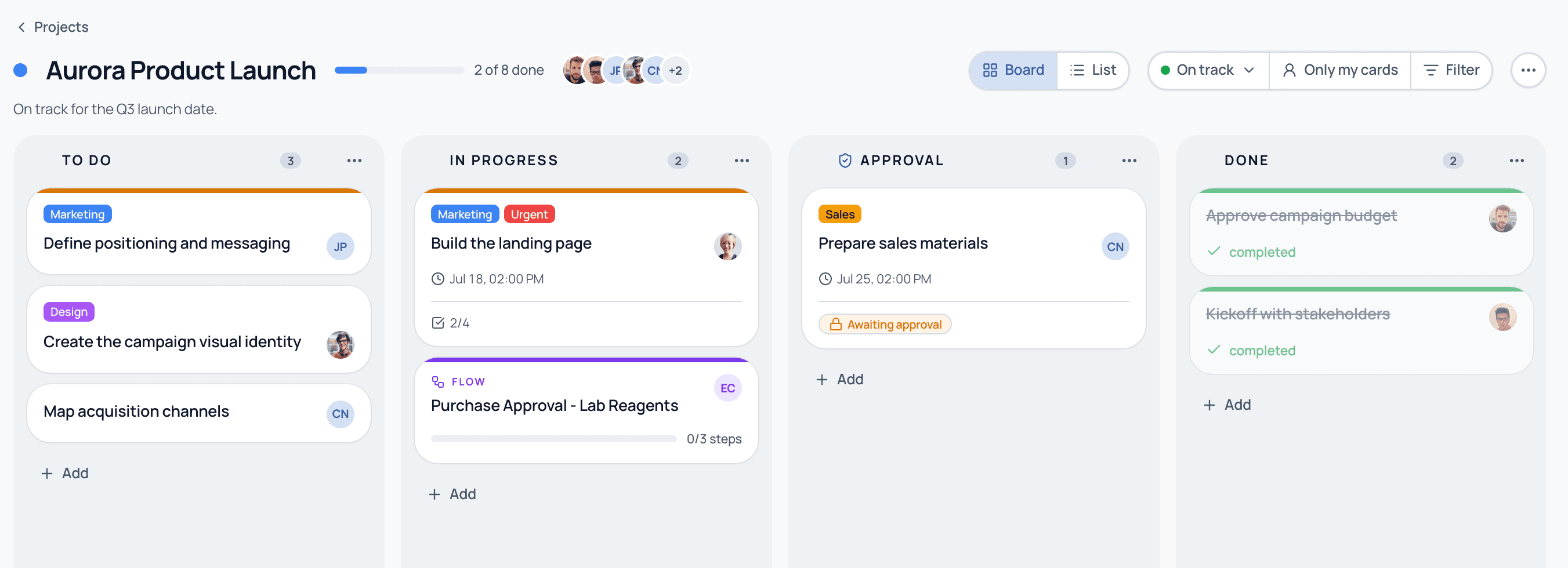
Open a project to see its board. Columns move left to right, and every card is a real piece of work with an owner, a due date, labels, and a checklist. The project header shows progress, the team, and a health badge (On track, At risk, Paused). Toggle between Board and List, filter, or narrow to just your cards.
A project board: cards with owners, labels, deadlines, and checklists; an approval column; and a Flow attached as a card in In progress.
The anatomy of a board
Six pieces make a project board work.
Columns
The stages of the project. You name and reorder them freely; a card's column is independent of whether it is complete.
Cards
Each card is a task with an owner, start and due dates, priority, labels, a checklist, attachments, and comments.
Approval column
Drop a card here and it triggers a formal approval from the approvers you set. Nothing advances without a recorded yes.
Done column
Moving a card here marks it complete. Completion is the source of truth, not just the visual position.
Attached Flows
A whole recurring process (a Flow run) can live on the board as a card, so a project can pull in the processes it depends on.
Project health
On track, At risk, or Paused, with a note from the owner, visible in the header so status never needs chasing.
Walkthrough
Run a project end to end
1
Create a project
Give it a name, a color, and an optional target date. Three columns (To do, In progress, Done) are created for you.
2
Shape your columns
Rename them to match how your team works and add columns like Approval or Blocked. Drag to reorder.
3
Add cards
Create a card per piece of work, assign an owner, set a due date and priority, and add a checklist so the detail lives on the card.
4
Attach a Flow
When the project needs a recurring process, attach a Flow run as a card. The board shows its progress; the Flow enforces its steps and approvals.
5
Add an approval gate
Mark a column as an approval column and pick approvers. Cards moved there wait for a recorded decision before continuing.
6
Track health
Set the project to On track, At risk, or Paused with a short note, so anyone can read the status at a glance.
The blend
Attach a recurring process to a project
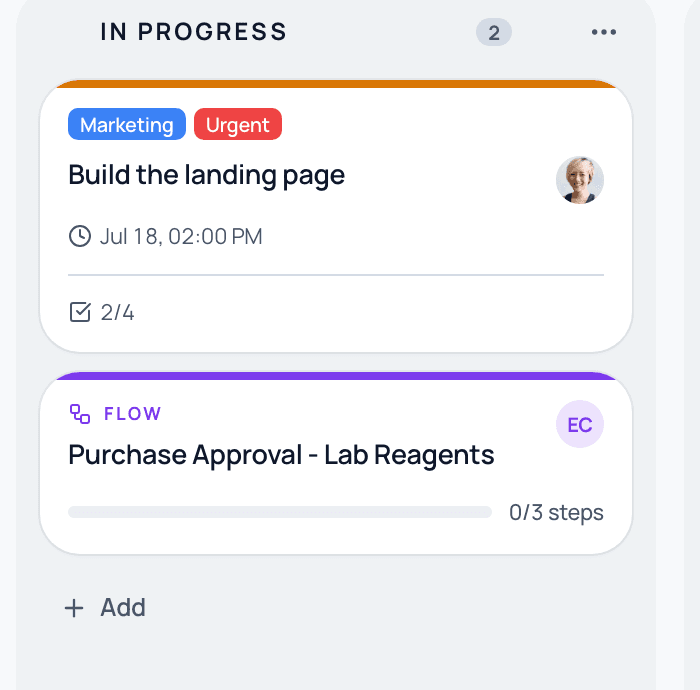
A project is rarely just loose tasks. When it needs a formal process, you attach an entire Flow as a card, for example a purchase approval with a finance gate and an audit trail. The project manager watches the card advance on the board; finance runs the process with full control.
The highlighted card is a Flow attached to the project. It carries its own steps, approvals, and audit trail while living on the board.
Use a project for work with a beginning and an end and many moving parts (a launch, an implementation). Use a Flow for work that repeats the same steps every time (onboarding, month-end close). A project can contain Flows; the two are designed to work together.
Common questions
What is the difference between a project and a Flow?
A project is an initiative run on a visual board where you drag cards. A Flow is a recurring process that advances step by step. Use projects for one-off initiatives, Flows for repeating processes, and attach Flows to projects when you need both.
Do projects have an audit trail?
Yes. Every card move, comment, approval, and attachment is recorded with an immutable timestamp, so a project stays auditable from start to finish, with exportable history.
How many projects can I have?
On the Starter plan you keep up to 3 active projects at a time (archived projects don't count). Business and Enterprise are unlimited.
Can I move from Trello, Asana, or Monday?
Yes. The board-and-card grammar is the same one your team already knows. The difference is that here a project comes with formal approvals, an audit trail, and the ability to attach your recurring processes.
Run projects with the rigor of your processes
See how a project board attaches Flows, gates approvals, and stays auditable, on a guided demo.