Every task needs an owner. Cadenio lets you assign to a specific user, a group, whoever started the run, or a person chosen by a condition, and even send a task outside your organization.
5 min read · Builders
People · Assignment
Four ways to assign a task
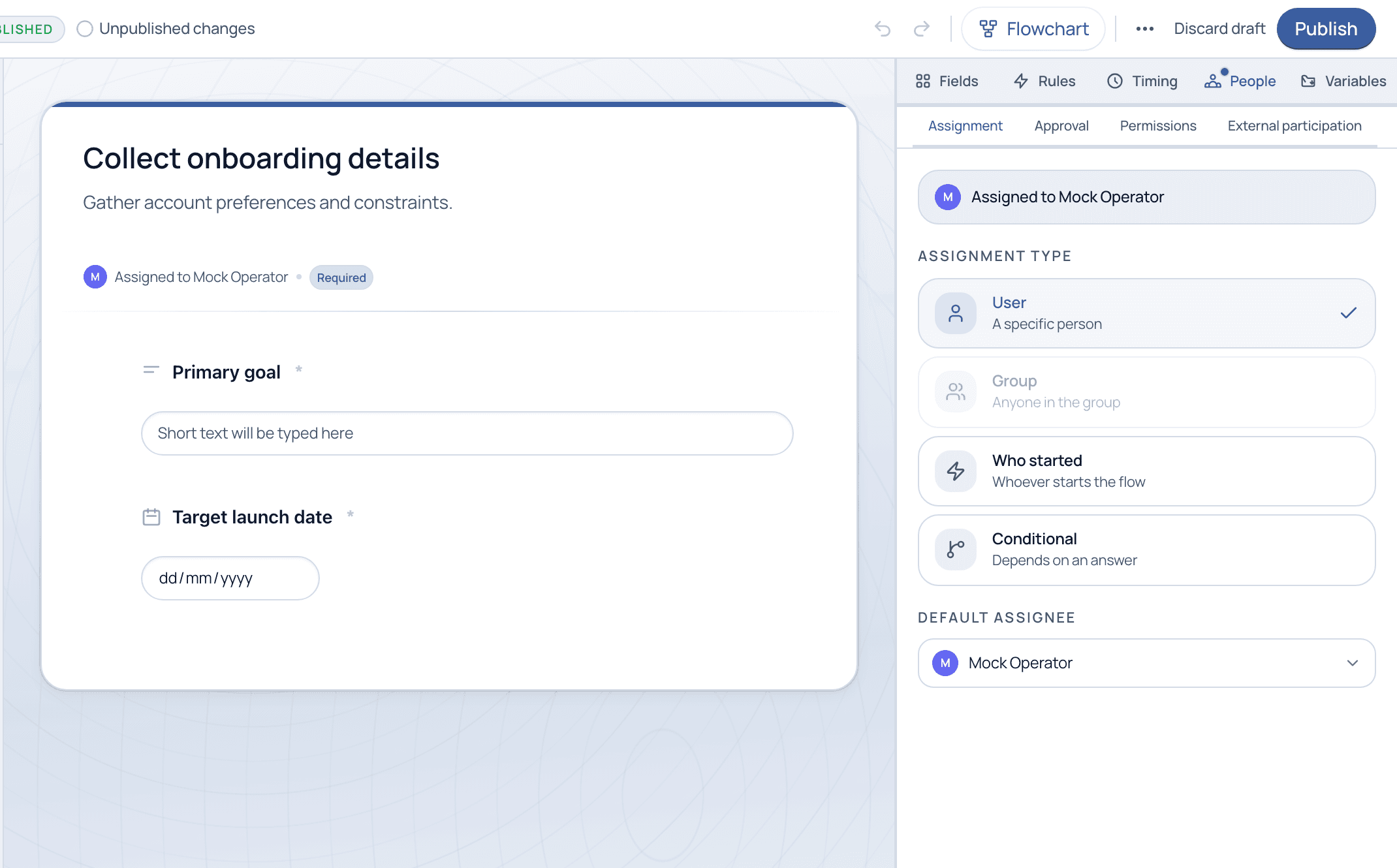
On the People tab, the Assignment section sets who owns the selected task. Pick a fixed User, a Group (anyone in it can pick it up), Who started (whoever launches the run), or Conditional (the assignee depends on an answer). A default assignee catches everything else.
People · Assignment. Choose User, Group, Who started, or Conditional, plus a default assignee.
Assignment types
When to use each
User: A specific person owns the task every time. Best for named responsibilities.
Group: Anyone in the group can claim the task. Best for shared queues like Support or Legal.
Who started: Assigns to whoever launched the run. Best for self-service and requester-driven steps.
Conditional: The assignee depends on a field answer, for example route to a region lead based on the selected region.
The People tab also covers
Assignment is one of four sections on the People tab.
Approval
Sign-off gates
•Require explicit approval
•ANY / ALL policies
•See the Approvals tutorial
Permissions
Who can see & act
•Per-task visibility
•Deny-by-default model
•See the Permissions tutorial
External participation
Outside the org
•Send a task to someone with no login
•They fill it in via a secure link
•Great for vendors and clients
Use Group assignment for anything a team shares, not a specific person. It removes the single point of failure when someone is out, and any group member can pick up the work.
Common questions
What happens if a conditional rule resolves to nobody?
The default assignee is the safety net. Cadenio never leaves a task ownerless: if the condition matches no one, it falls back to the default so work is never silently dropped.
Can someone outside my company complete a task?
Yes, with External participation. The assignee can send the task to an external email; that person fills it in through a secure link without needing a Cadenio account.
Get the right work to the right people
We will map your team's responsibilities into assignment rules on a guided demo.